Essentials Coworker
Build, manage, and share AI Copilot skills across the organisation with a central skill catalog and built-in skill builder.
Configuration Guide
- Add the Essentials Coworker web part to your AI hub or team site.
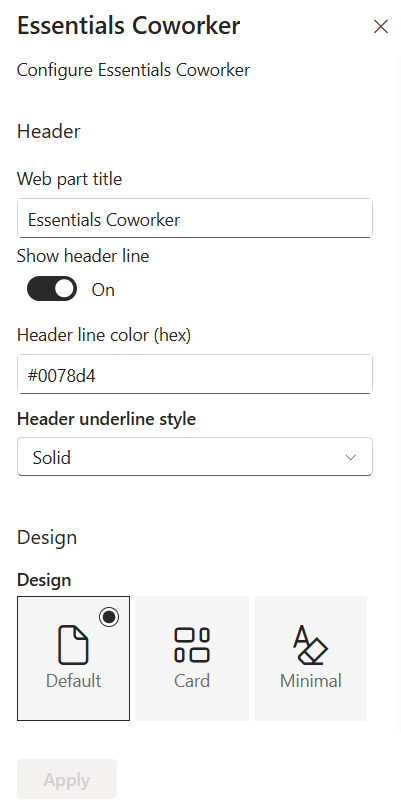
- Enter the web part title (Default: Essentials Coworker), toggle the header line on/off, set the header line hex colour (e.g., #0078d4), and choose the underline style (e.g., Solid).
- Select Default for full-width skill management, Card for grid-based visual representation, or Minimal for a compact sidebar view.
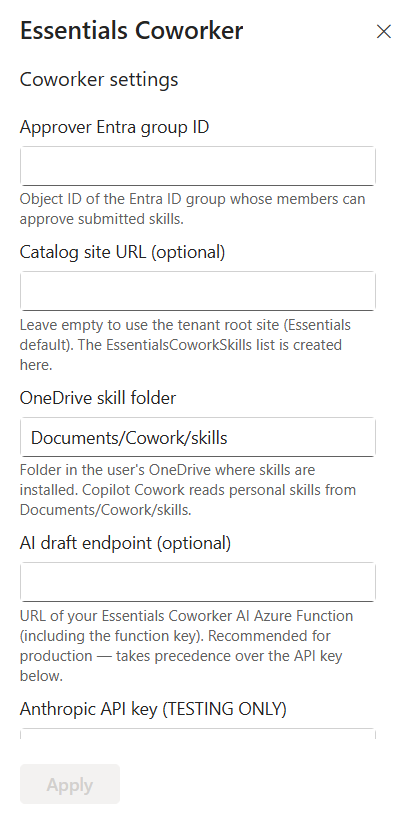
- Enter the Object ID of the Microsoft Entra ID group responsible for approving user-submitted skills into the corporate catalog.
- Specify the Catalog site URL where the central skill repository resides (defaults to tenant root site), and set the OneDrive skill folder path (Default: Documents/Cowork/skills).
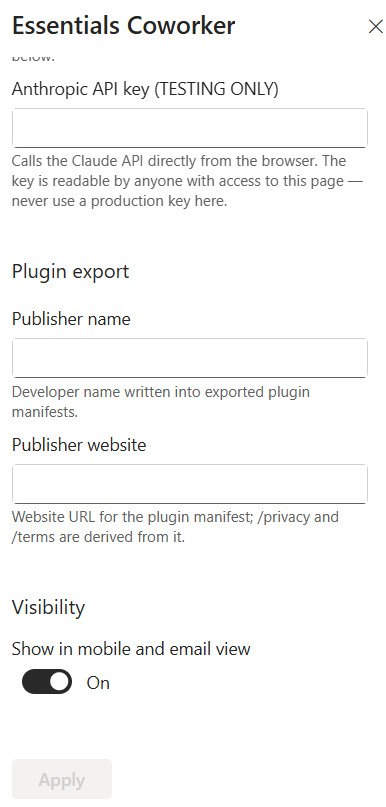
- Enter the URL of your deployed Essentials Coworker AI Azure Function (including function key). For browser-based testing only, enter an Anthropic API key — never use a production key as it is stored client-side.
- Enter the publisher name and publisher website URL to be written into the manifest of exported Copilot plugins.
- Toggle Show in mobile and email view on or off, click Apply to save changes, then republish the SharePoint page.
Key Features Configuration
| Feature | Description | Configuration |
|---|---|---|
| Skill Catalog | Browse, search, and discover pre-built skills | Category filtering, dynamic search, metadata display |
| Skill Builder | Create custom Copilot skills via step-by-step form | Title, description, instructions, triggers, examples, guardrails |
| SKILL.md Viewer | Inspect raw markdown definitions | One-click view on any skill card |
| Plugin Export | Export as individual plugin or bulk plugin pack | Single or bulk export actions |
| OneDrive Sync | Add skills to personal OneDrive | One-click add to OneDrive |
| Corporate Catalog | Submit skills for admin review | Submission workflow with admin approval |
Property Pane Options
| Option | Type | Description |
|---|---|---|
| Web part title | Text | Display name shown at the top of the webpart (Default: Essentials Coworker) |
| Show header line | Toggle | Show or hide the decorative accent line beneath the header title |
| Header line color | Colour picker | Hex colour code for the header line (e.g., #0078d4) |
| Header underline style | Dropdown | Visual style of the header line (e.g., Solid) |
| Design layout | Radio | Default, Card, or Minimal layout style |
| Approver Entra group ID | Text (GUID) | Object ID of the Entra ID group that approves submitted skills |
| Catalog site URL | URL | SharePoint site URL for the central skill repository (defaults to tenant root) |
| OneDrive skill folder | Text | Target folder path in personal OneDrive (Default: Documents/Cowork/skills) |
| AI draft endpoint | URL | URL of the deployed AI Azure Function (including function key) |
| Anthropic API key (TESTING ONLY) | Password | Claude API key for testing AI drafting client-side — never use a production key |
| Publisher name | Text | Developer or company name in exported plugin manifests |
| Publisher website | URL | Official website URL for plugin manifest (privacy/terms derived automatically) |
| Show in mobile and email view | Toggle | Enable or hide the webpart on mobile devices and email renderings |
Illustration