Essentials RSS Feed
Integrate external news, blog posts, and social updates into SharePoint pages via JSON feeds.
Configuration Guide
To configure the Essentials RSS Feed webpart, edit your page, select the webpart, and open the properties pane on the right.
Feed Source
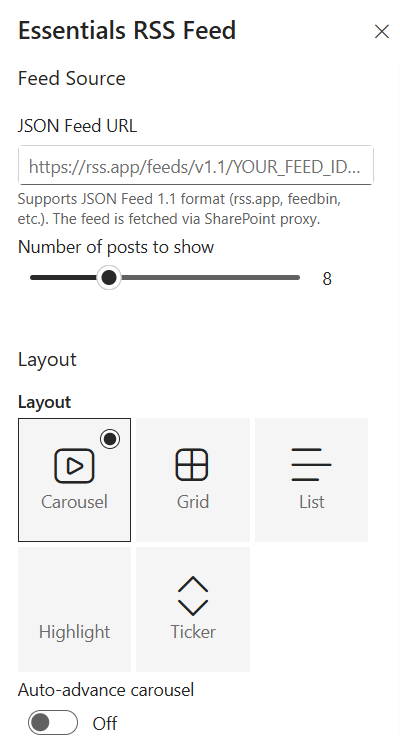
Specify the endpoint for fetching external posts and control how many items are displayed:
- JSON Feed URL — Input the feed URL endpoint. Supports JSON Feed 1.1 format (e.g., from services like rss.app or feedbin). Feeds are fetched securely via a SharePoint proxy.
- Number of posts to show — Use the slider to set the maximum number of feed posts to display (e.g., 8).
Layout Options
Select the visual format that best matches your page layout and user experience needs:
- Carousel — Interactive sliding card display featuring one or more posts at a time.
- Grid — Multi-row, multi-column card layout that expands across available page space.
- List — Clean, vertical list view ideal for narrow page columns.
- Highlight — Featured spotlight view that prominently highlights main content.
- Ticker — Vertically scrolling continuous headline feed.
- Auto-advance carousel — Toggle On/Off to enable or disable automatic slide transitions when using the Carousel layout.
Display Settings
Fine-tune post details, text limits, navigation behavior, and color accents:
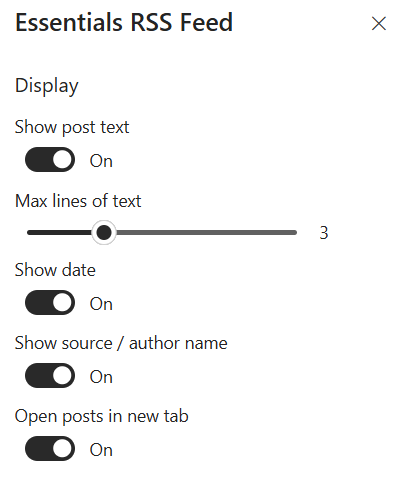
- Show post text — Toggle On/Off to display or hide summary body text for each post.
- Max lines of text — Use the slider to specify the line limit for post text summaries before truncating (e.g., 3).
- Show date — Toggle On/Off to display the publication date on post cards.
- Show source / author name — Toggle On/Off to show the author or origin source of the feed item.
- Open posts in new tab — Toggle On/Off to force external article links to open in a new browser tab.
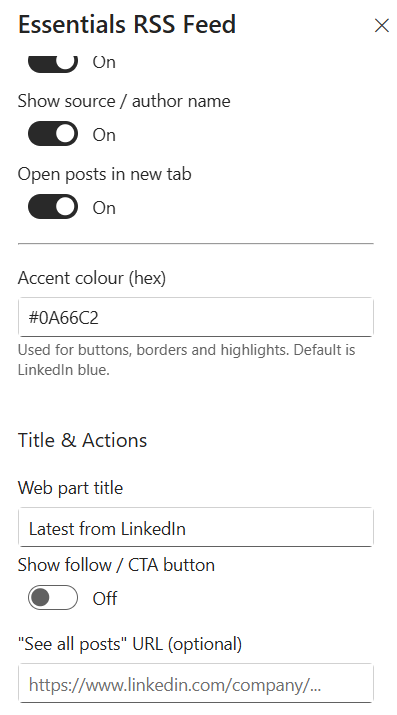
- Accent colour (hex) — Input a custom hex code (e.g., #0A66C2) used for buttons, borders, and UI highlights. Default is LinkedIn blue.
Title & Actions
Configure section headings and external navigation links:
- Web part title — Enter a heading to display above the feed (e.g., Latest from LinkedIn).
- Show follow / CTA button — Toggle On/Off to enable a primary call-to-action or follow button.
- "See all posts" URL (optional) — Specify an external link address (e.g., https://www.linkedin.com/company/...) to direct users to the full external feed page.
Key Features Configuration
| Feature | Description | Configuration |
|---|---|---|
| Feed source | Endpoint for fetching external posts | JSON Feed 1.1 URL, fetched securely via a SharePoint proxy |
| Number of posts | Maximum feed posts displayed | Slider (e.g., 8) |
| Layout | Visual format of the feed | Carousel, Grid, List, Highlight, Ticker |
| Auto-advance carousel | Automatic slide transitions | Toggle On/Off |
| Post text | Summary body text visibility | Toggle On/Off |
| Max lines of text | Line limit for post summaries | Slider (e.g., 3) |
| Date & source | Publication date and author display | Toggle On/Off |
| Open in new tab | External link behaviour | Toggle On/Off |
| Accent colour | Buttons, borders, and UI highlights | Hex code (default: LinkedIn blue #0A66C2) |
| Title & actions | Heading and navigation links | Web part title, follow / CTA button, "See all posts" URL |
Property Pane Options
| Option | Type | Description |
|---|---|---|
| JSON Feed URL | Text | Feed URL endpoint (JSON Feed 1.1) |
| Number of posts to show | Slider | Maximum number of feed posts displayed (e.g., 8) |
| Layout | Radio | Carousel, Grid, List, Highlight, Ticker |
| Auto-advance carousel | Toggle | Automatic slide transitions in Carousel layout |
| Show post text | Toggle | Display or hide summary body text |
| Max lines of text | Slider | Line limit for post text summaries (e.g., 3) |
| Show date | Toggle | Display publication date on post cards |
| Show source / author name | Toggle | Show author or origin source of the feed item |
| Open posts in new tab | Toggle | Force external article links to open in a new tab |
| Accent colour (hex) | Colour picker | Custom hex code for buttons, borders, and UI highlights |
| Web part title | Text | Heading displayed above the feed |
| Show follow / CTA button | Toggle | Enable a primary call-to-action or follow button |
| "See all posts" URL | Text | External link to the full external feed page |
Illustration