Essentials FAQ
Display interactive, accordion-style FAQs sourced from a centralized admin-managed registry or edited inline on the page.
Configuration Guide
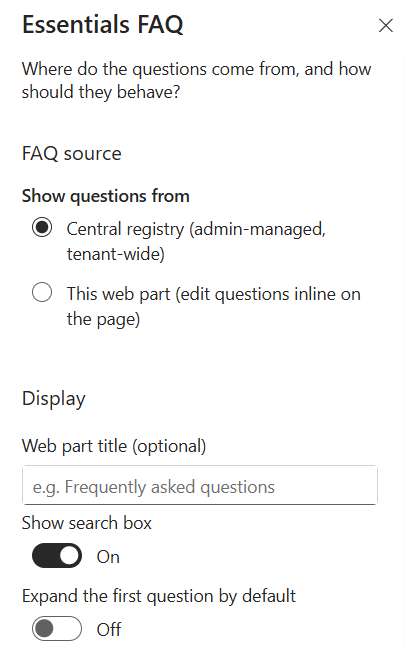
To configure the Essentials FAQ webpart, edit your page, select the webpart, and open the properties pane on the right.
FAQ Source
Choose how question-and-answer content is sourced and managed.
Show questions from:
- Central registry (admin-managed, tenant-wide) — Pulls standardized questions from a central list managed across the tenant by administrators.
- This web part (edit questions inline on the page) — Allows authors to create, update, and manage FAQ items directly within the webpart on the SharePoint page.
Display Settings
Customize the visual behavior and organization of the FAQ items:
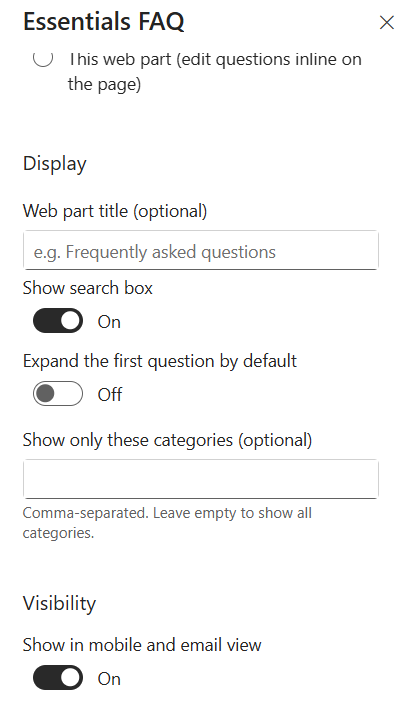
- Web part title (optional) — Enter a heading to display above the FAQ list (e.g., Frequently asked questions).
- Show search box — Toggle On/Off to display an interactive search field above the FAQ items, allowing users to filter questions in real time.
- Expand the first question by default — Toggle On/Off to automatically open the top FAQ item when the page loads.
- Show only these categories (optional) — Specify specific categories to display by entering a comma-separated list (e.g., IT, HR, Security).
Note: Leave this field blank to show all available categories.
Visibility Settings
Manage client and device layout display settings:
- Show in mobile and email view — Toggle On/Off to enable or hide the FAQ section when rendered on mobile screens or email previews.
Key Features Configuration
| Feature | Description | Configuration |
|---|---|---|
| FAQ source | Where question-and-answer content comes from | Central registry (admin-managed) or inline editing on the page |
| Web part title | Optional heading above the FAQ list | Free-text field (blank hides the title) |
| Search box | Interactive search over FAQ items | Toggle On/Off |
| Auto-expand first question | Open the top FAQ item on page load | Toggle On/Off |
| Category filtering | Restrict displayed questions to specific categories | Comma-separated list (blank shows all) |
| Mobile & email view | FAQ visibility on mobile screens and email previews | Toggle On/Off |
Property Pane Options
| Option | Type | Description |
|---|---|---|
| Source | Radio | Central registry (admin-managed, tenant-wide) or this web part (inline editing) |
| Web part title | Text | Optional heading above the FAQ list |
| Show search box | Toggle | Display an interactive search field above the FAQ items |
| Expand the first question by default | Toggle | Automatically open the top FAQ item when the page loads |
| Show only these categories | Text | Comma-separated category list (blank shows all) |
| Show in mobile and email view | Toggle | Enable or hide the FAQ section in mobile screens and email previews |
Illustration